

Roles and Permissions
Roles and Permissions
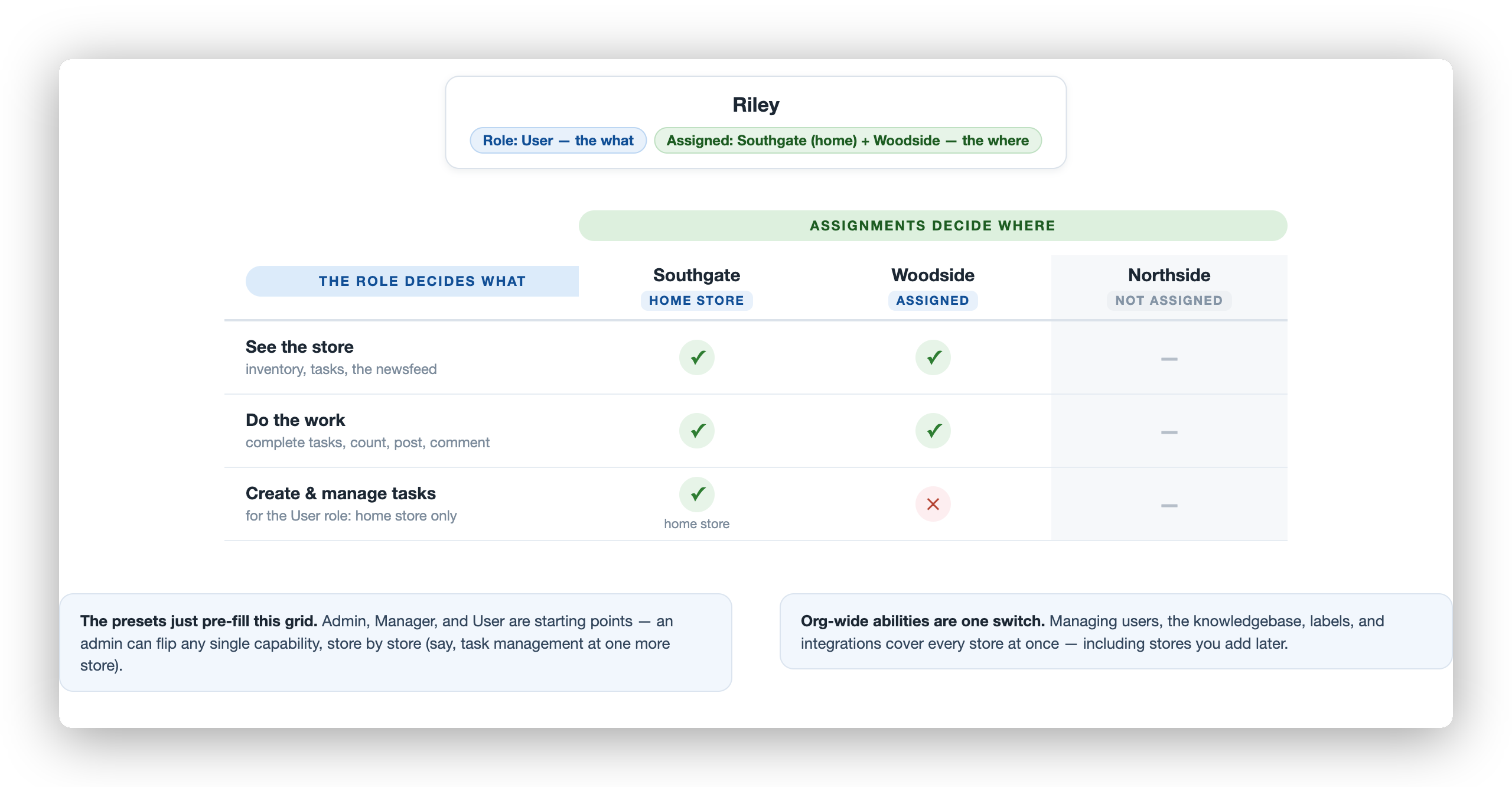
Section titled “Roles and Permissions”Every person in FastQuery has a role. A role is a named set of permissions. The role decides what a person can do. Their facility assignments decide where they can do it.
Every organization starts with two built-in roles, user and manager, plus the special admin role. Admins can create more roles when a team needs something specific. See Customizing access.
The Built-in Roles
Section titled “The Built-in Roles”Full access to everything in FastQuery. Admins manage users, billing, integrations, and roles. They see data across all facilities. Give this role to store owners and IT managers. Admin is not an editable role. It is a single all-access switch.
manager
Section titled “manager”Managers run day-to-day operations. They manage the knowledge base and label templates for the whole organization. They can export the inventory spreadsheet. At their assigned facilities, they see everything and manage tasks. This role fits store managers, department leads, and regional supervisors.
The most common role. Users chat with the AI assistant, look up inventory, post to the newsfeed, and count inventory. They create and manage tasks at their home facility only. At other assigned facilities, they can see what happens but cannot create tasks. This role fits store associates and team members.
What Each Role Can Do
Section titled “What Each Role Can Do”| Capability | admin | manager | user |
|---|---|---|---|
| Use the AI assistant | Yes | Yes | Yes |
| View inventory | All facilities | Assigned facilities | Assigned facilities |
| Create posts and count inventory | Yes | Yes | Anywhere they can view |
| Create and manage tasks | Yes | Assigned facilities | Their home facility only |
| Manage knowledge base and labels | Yes | Yes (org-wide) | No |
| Export inventory to CSV | Yes | Yes | No |
| Manage users | Yes | No | No |
| Edit crew profiles | Yes | Their store’s crew | Own profile only |
| Manage billing | Yes | No | No |
| Configure integrations | Yes | No | No |
How Facility Access Works
Section titled “How Facility Access Works”A person’s role sets what they can do. Their facility assignments set where they can do it.
- A person sees data only for their assigned facilities. Nothing is added automatically.
- Distributor warehouses (Ace Hardware, Orgill, and so on) become visible after your access request for that supplier is approved. See Warehouse Suppliers. You can tune which warehouses each store works with. See Warehouses per Store.
- Admins see all facilities.
An example. A user with the home facility “Main Street Store” creates and manages tasks there. They see that store’s inventory, tasks, and feed. At a second assigned store, they can view, post, and count. They cannot create tasks there. A manager assigned to three stores manages tasks at all three.
The home facility comes from the Primary Facility field on the Manage Users page. For details, see Primary (home) facility.
The Roles Tab
Section titled “The Roles Tab”Admins see all roles on the Roles tab of the Manage Users page. Each row is one role. The three permission columns show what the role grants at each scope: Organization-wide, Primary facility, and Other facilities. The Assigned users column counts the people who hold the role.
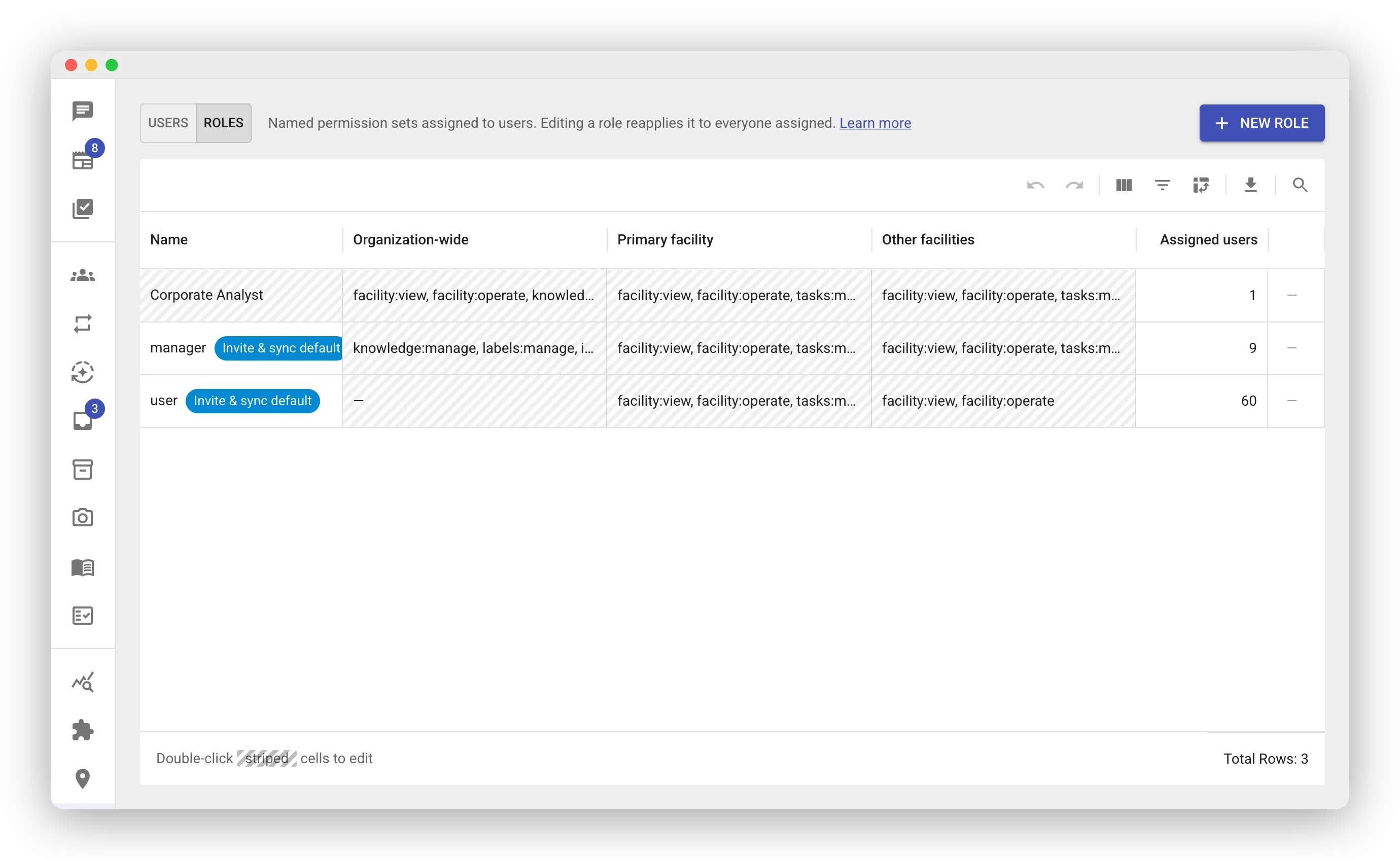
The user and manager rows carry an Invite & sync default chip. FastQuery assigns these roles by default to invited and synced people. You cannot rename or delete them. You can edit what they grant.
The admin role does not appear on this tab. It is not an editable role.
Editing a role
Section titled “Editing a role”- Double-click one of the three permission cells on the role’s row.
- The cell becomes a multi-select. Current permissions show as chips. A dropdown lists every permission.
- Click a permission to grant it or revoke it.
- Click anywhere outside the cell to save. Escape discards the edit instead.
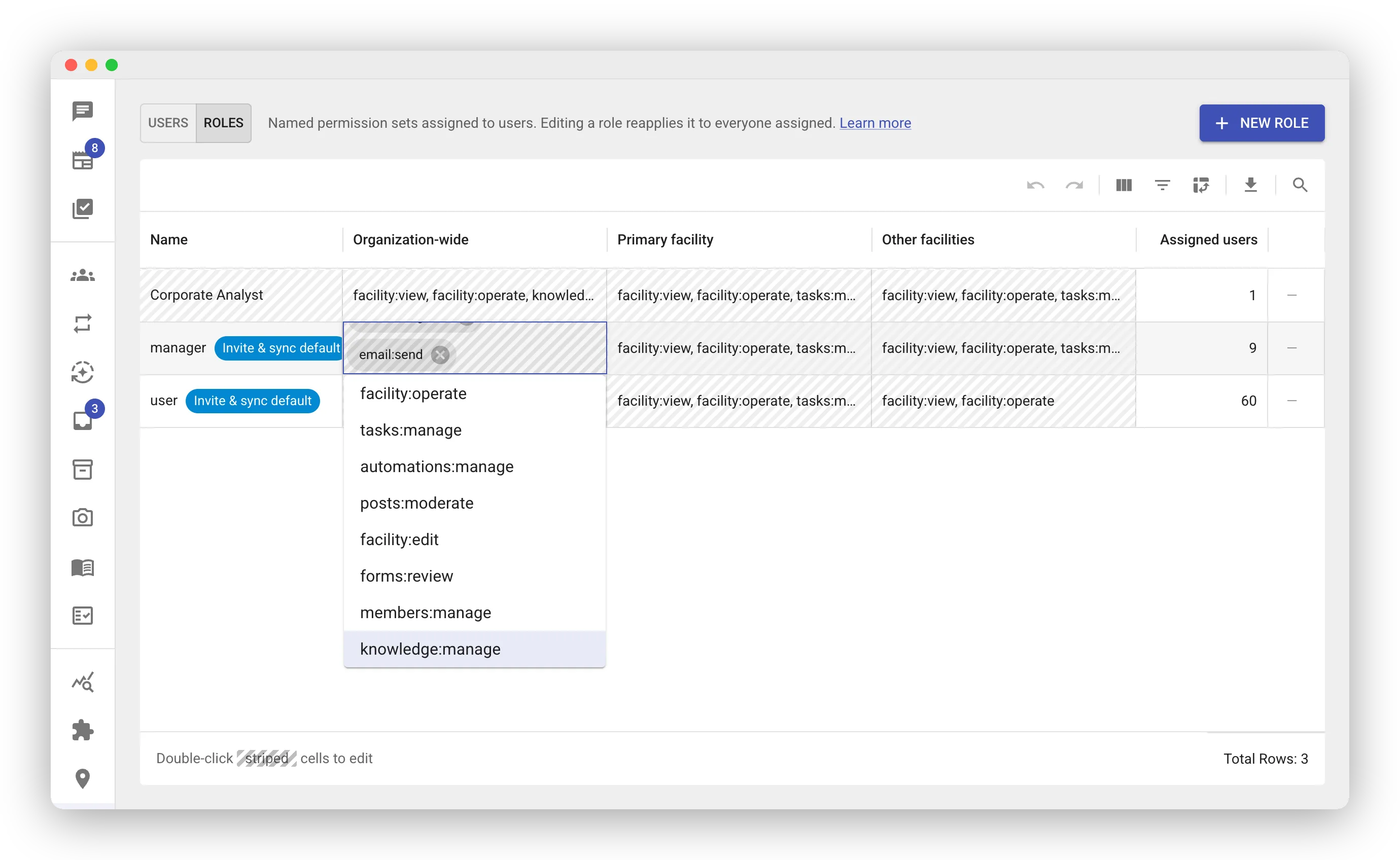
Editing a role updates everyone who has it. Every person with the role gets the new permissions automatically. Check the Assigned users count before you edit a role with many people.
Customizing access
Section titled “Customizing access”The built-in roles are a starting point. Some teams need access that does not fit them. Examples are area managers who oversee several stores, or an analyst who queries data across the organization. An admin creates a new role for the team and assigns it like any other role.
A role has three permission sets:
- Organization-wide — abilities that apply across every facility. Examples are managing the knowledge base or querying datasets.
- Primary facility — what the person can do at their home facility.
- Other facilities — what they can do at every other assigned facility.
When you assign the role to a person, FastQuery fills in their actual facilities. The primary set lands on their home facility. The other set lands on the rest. The same role works for people at different stores.
Creating a role
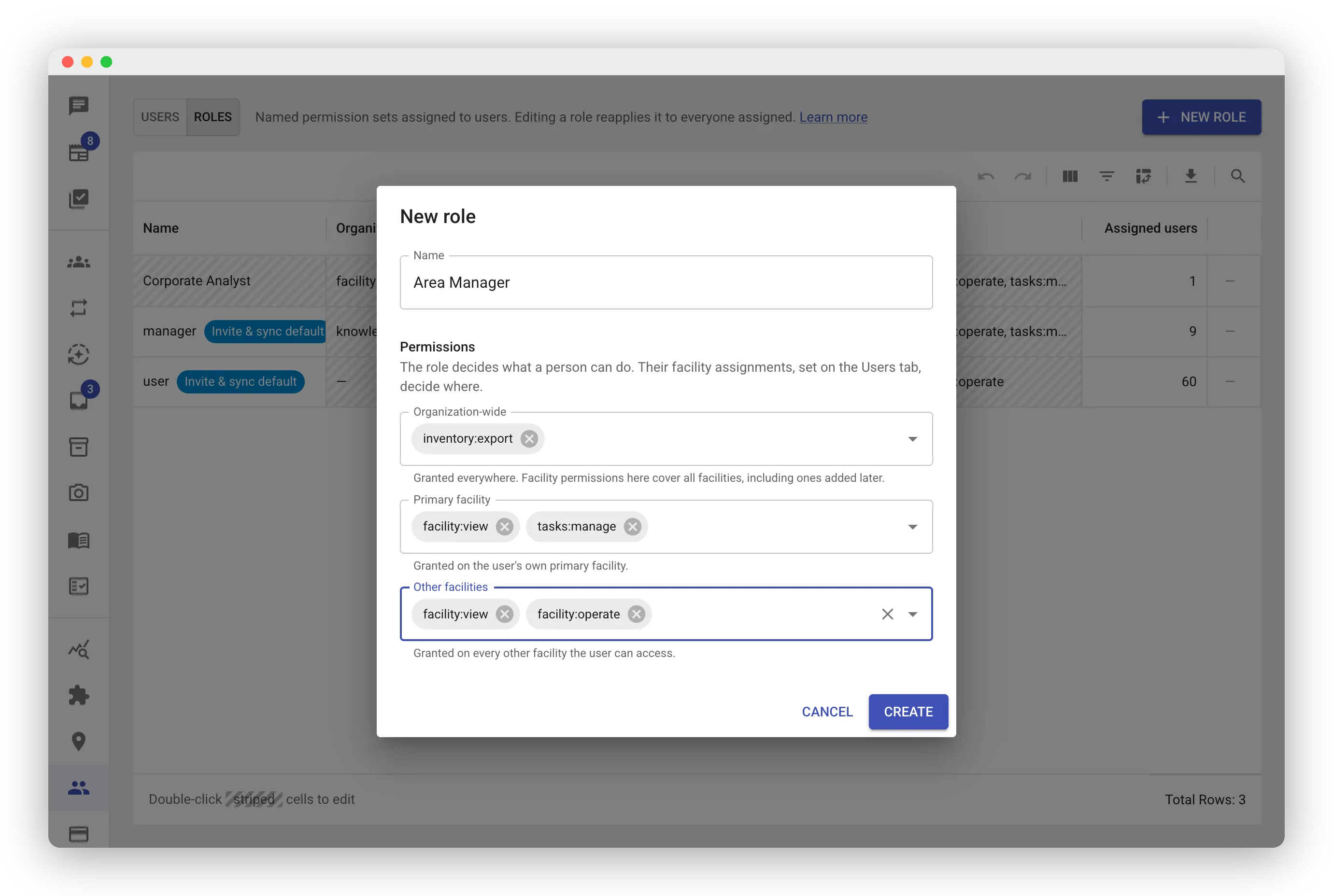
Section titled “Creating a role”- On the Roles tab, click New Role. A dialog opens.
- Type the role name.
- Select the permissions for each scope: Organization-wide, Primary facility, and Other facilities.
- Click Create. Nothing is saved until you click Create. Cancel closes the dialog without a trace.
- Assign the role to people on the Users tab.
The dialog checks the permission structure before it saves. For example, a scope with grants must include facility:view. A problem shows as a message in the dialog.
To remove a role you do not need, click the trash icon at the end of its row. Click it again to confirm. A role that is in use cannot be deleted. Move its people to another role first.
A few more rules:
- Only admins can create, edit, or delete roles. Assigning an existing role needs only user-management access.
- People set up before roles existed show an empty Role cell in the Users grid. Assign them a role to bring them into the system.
Org-wide vs. per-facility
Section titled “Org-wide vs. per-facility”Permissions come in two kinds:
- Org-wide permissions apply across your whole organization. Examples are managing users, the knowledge base, labels, and integrations. One grant covers every facility, including facilities you add later.
- Per-facility permissions are granted through the primary-facility and other-facilities sets. Examples are viewing a store or managing its tasks. You can also place a per-facility permission in the org-wide set. It then applies at every facility, including facilities you add later.
This lets you mix and match. A role can keep someone a plain user everywhere but switch task management on at their home store. A role can also grant store permissions organization-wide without full manager access.
What each capability means
Section titled “What each capability means”The permission editor shows short keys. The tables below state what each key grants. Most organizations never need this reference. The built-in roles cover them.
Org-wide (one switch covers the whole organization, including facilities you add later):
| In the editor | What it grants |
|---|---|
members:manage |
Add, edit, and remove team members, and set what each person can access |
knowledge:manage |
Add, edit, and delete knowledge-base documents — the company files and notes the AI reads to answer |
labels:manage |
Edit the retail price-tag templates — the print layout used when printing shelf tags |
integrations:configure |
Set up and change data integrations, like the Epicor Eagle inventory sync |
integrations:rerun |
Re-trigger an integration’s import to pull fresh data without waiting for the next scheduled sync |
inventory:export |
Download the inventory grid as a CSV spreadsheet |
email:send |
Let the assistant email your team members on your behalf (without it, it can reach only support) |
market_prices:manage |
Set up competitor price tracking: choose the tracked items, the competitors, the ZIP codes, and how often to check. Tracking is priced per listing check (free while in beta), so this is an owner-level switch that no built-in role grants |
chat:advanced_mode |
Use Advanced Mode in chat: query the organization’s operational datasets (sales, margins, inventory movement across every store) and fan out read-only helpers for bigger requests. Org-wide on purpose: the data spans every store |
chat:advanced_modeis an advanced AI feature, so its use draws on the organization’s monthly advanced budget — when the budget is exhausted it pauses until it’s raised or the month rolls over, even for users who hold the permission. (Ordinary web search, news search, and web-page reading need no permission and are included in the subscription.)
Per-facility (granted through the primary-facility and other-facilities sets):
| In the editor | What it grants |
|---|---|
facility:view |
See a store’s inventory, tasks, and newsfeed |
facility:operate |
Do the everyday work at a store: complete and reassign tasks, count inventory, post to the newsfeed, and comment |
tasks:manage |
Create, edit, and delete that store’s tasks — including editing anyone’s task, not just your own |
automations:manage |
Create automations for that store (each automation is managed by whoever created it; org admins can see and pause any) |
profiles:manage |
Edit the profile of anyone whose home store this is — role, skills, certifications, schedule, and notes — by asking the assistant. The person gets an email listing every change |
posts:moderate |
Edit or delete other people’s newsfeed posts at that store |
facility:edit |
Edit a store’s details (name and address) and its floor map |
forms:review |
Open the form results and see — or delete — everyone’s submissions at that store; without it, people see only the fills they made themselves, on the task itself |
Choosing the Right Role
Section titled “Choosing the Right Role”- Store owner setting up FastQuery? Start as an admin.
- Trusted store manager? The manager role with their assigned stores.
- Most of your team? The user role covers everyday needs.
- A recurring special case, like area managers or analysts? Create a role for it once. Assign it to each of them.
You can change a person’s role at any time on the User Management page.