
References and Embeds in Chat
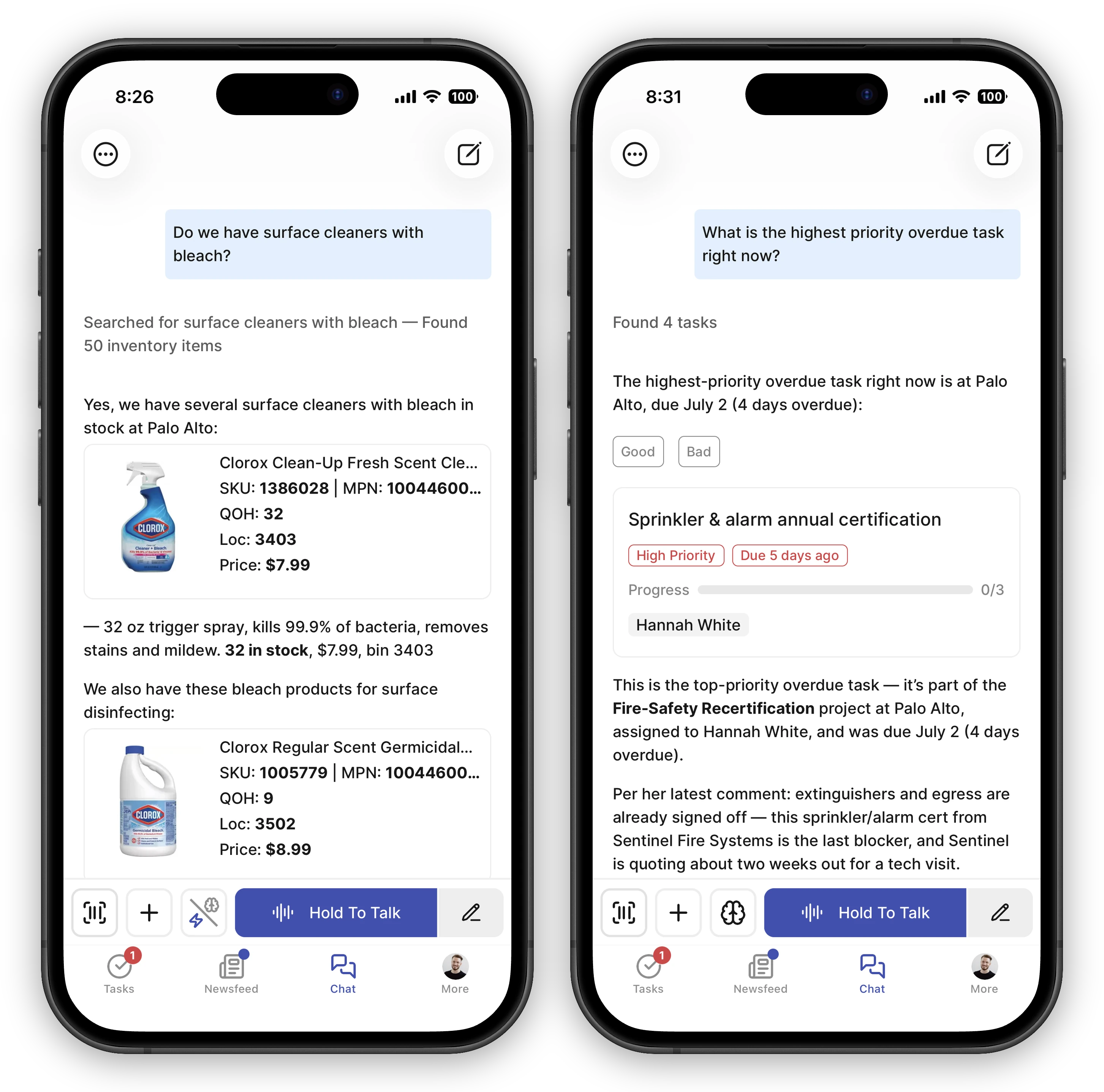
When the AI mentions a product, task, teammate, post, or facility in its reply, it doesn’t just print the name — it embeds a small card with the live details. Tap the card to open the full record, or just glance at it for the info you need.
What Gets Embedded
Section titled “What Gets Embedded”The AI renders cards for any entity it references:
- Products — name, price, on-hand quantity, bin, and a small image when available. Useful when you ask “Do we have X?” — the reply contains the card you need to take action.
- Tasks — title, assignee, due date, priority, and progress (X of Y steps done). Appears when you ask about a specific task or after the AI creates one for you.
- Teammates — name, role, and avatar. Appears when the AI mentions someone (e.g., “Sarah is on the paint task”).
- Posts — the original post content rendered inline. Appears when the AI references something from the newsfeed.
- Facilities — a store or location, with its name and details. Appears when the AI mentions a specific store (e.g., comparing stock across your facilities).
Cards always show live data. Stock levels, task progress, and post content reflect the moment you’re reading — not a cached snapshot from when the AI replied.
Documents from the AI
Section titled “Documents from the AI”For long-form answers — a reorder plan, a comparison write-up, a policy draft — the AI can deliver a document instead of an extra-long chat message. The document appears in the reply as a card showing the first part of the content.
- Tap or click the card to open the full document, formatted for reading — headings, tables, and lists all render properly.
- Download it from the open document as a PDF (ready to print or email) or as the original Markdown file.
- Works the same in the web app and the mobile app.
One thing to know about PDFs from your phone: if the document mentions products or tasks, the phone’s PDF leaves out those cards — you get the words, but not the little cards with pictures and details. Need the full version with the cards? Open the same document in FastQuery on your computer and download the PDF there.
If you want a document rather than a chat reply, just ask — “write this up as a document I can print” works.
Posts as Embeds in Chat
Section titled “Posts as Embeds in Chat”When you or the AI reference a newsfeed post, the post appears inline as an embed — the full text, any attached photos, and the author’s name. You can read it without leaving the conversation, and tap through if you want to react or comment.
The reverse also works: a post you create from chat (for example, “Post a shift handoff that Aisle 5 is mid-reset”) shows up in the feed for the facility you posted to, while the chat keeps a reference to the published post.
System Events in the Feed
Section titled “System Events in the Feed”Some activity in your store generates system event posts in the newsfeed automatically — when tasks are created or completed, and when a teammate logs in for the first time. These render as compact cards in the feed and can also appear as embeds in chat when you ask about recent activity.
Following a Reference
Section titled “Following a Reference”- Tap (mobile) or click (web) any card to open the full record.
- The card stays in the conversation so you can come back to it.
- Follow-up questions can refer to the card by name — “what’s the stock on that DeWalt?” works after the AI has already shown the product.
On the web: stepping through references
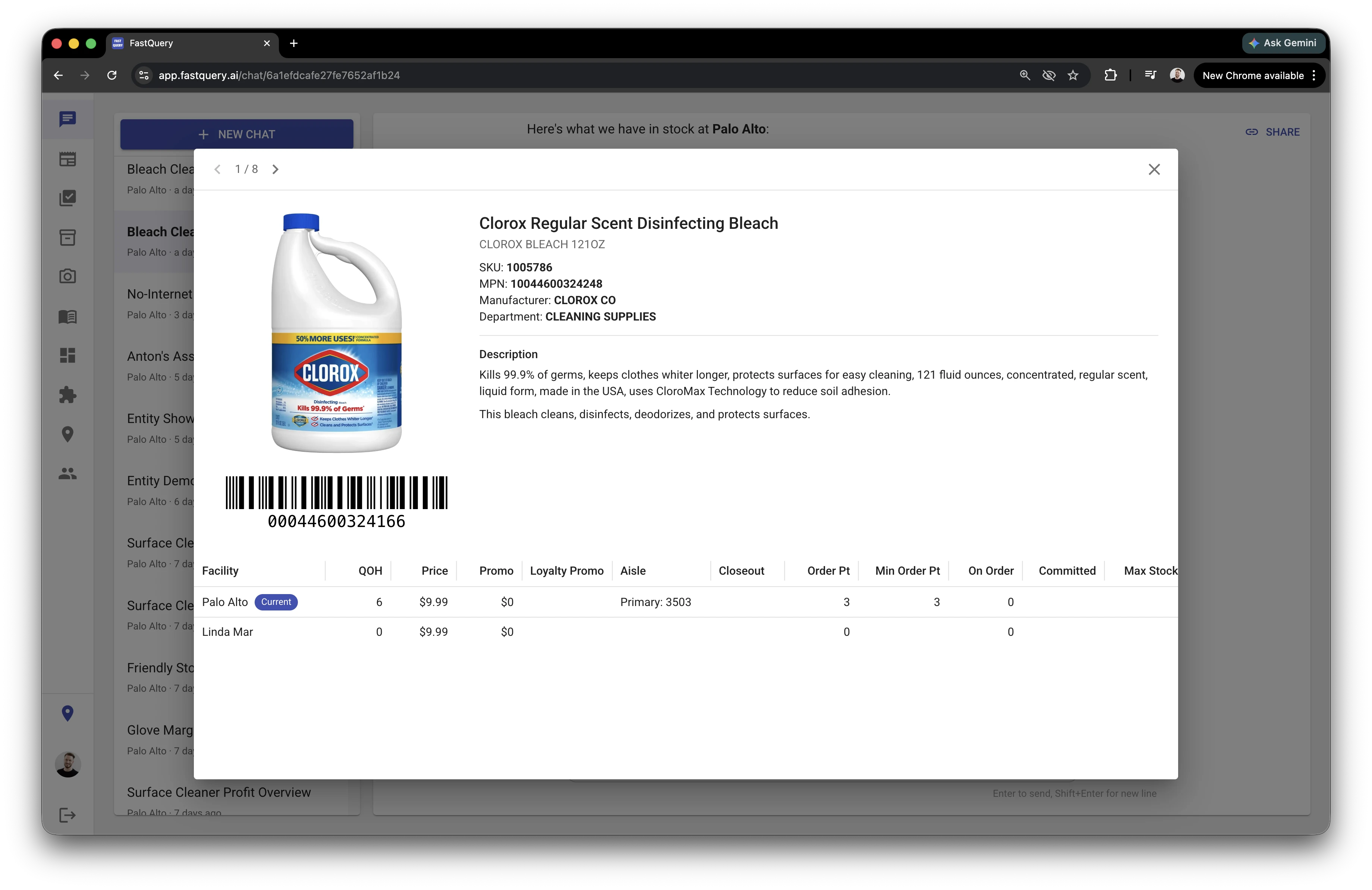
Section titled “On the web: stepping through references”In the web app, clicking any reference in a chat answer opens a full-view overlay — and that overlay pages through every entity the message references, not just the one you clicked. A reply that mentions three products, a task, and a teammate becomes a five-card set you can flip through without going back to the chat.
Move between them with:
- The on-screen arrow buttons on either side of the overlay.
- The left and right arrow keys.
- The 1 / N counter at the top tells you where you are in the set and how many there are.
This is handy when a single answer references a lot at once — you can review each product, task, or store in turn, then close the overlay to return to the conversation.
- Don’t memorize SKUs or task IDs — refer to things by name and the AI will resolve them to the right card.
- Tapping a card opens the full record — there’s no separate expand step.
- Images in a reply are centered and sized to fit the chat bubble; on mobile, pinch an image to zoom in for detail.