
Advanced Features
The assistant’s everyday work — searching your inventory, tasks, posts, and team, creating tasks and posts, reading and updating the knowledgebase — is part of the subscription, with no metering beyond everyday fair use. So is ordinary web research — searching the web and the news, and reading pages, work in every chat with nothing metered; see Web Search and News.
The advanced features go further: conversations that run entirely on the most capable model, deep analysis of your point-of-sale data guided by a library of tested procedures, specialized market-research lookups, and heavy jobs like plan take-offs and department-wide sweeps. These are metered against a monthly advanced budget your organization controls — see Budget and Pricing.
The simplest way to think about it: the advanced features live inside Advanced Mode chats, and that’s where the budget is spent. The one advanced feature outside a chat you’re typing in is automations — their scheduled runs draw on the same budget.
Advanced Mode
Section titled “Advanced Mode”Advanced Mode is a chat mode for the heaviest questions, currently in beta. It does two things no normal chat does:
- The whole conversation runs on Max, the most capable model — locked in from the first message to the last. (Model tiers are explained in Choosing How the AI Responds.)
- The AI gets direct access to your store’s operational data — sales, margins, and inventory movement across every location, straight from your point-of-sale exports. That’s where the deep analysis lives: store-to-store inventory balancing, margin investigations, replenishment reviews, per-clerk activity — anything that needs real queries over months of history.
You choose Advanced Mode when you start a chat, with the Advanced Mode button next to the chat input — on both mobile and web. The choice is locked for that conversation: an Advanced Mode chat stays on Max the whole way (there’s no model button to flip), and a normal chat can’t switch into it mid-way — start a new chat to change modes.
Two things are needed before an Advanced Mode chat can start; if either is missing, the button shows what’s needed instead of starting a chat:
- Your point-of-sale data is connected and loaded. The organization’s POS exports must be flowing into FastQuery’s datasets — on Epicor Eagle, that’s the Advanced Data Exports.
- The
chat:advanced_modepermission. Access to the datasets is org-wide — the data spans every store, including sales and margin figures — so an admin grants it deliberately; admins and the manager role have it by default. See Roles and Permissions.
Advanced Mode conversations draw on the organization’s advanced budget, and they never fall back to a lesser model when it runs out — they pause instead. See Budget and Pricing for exactly what’s metered and what happens when the budget is spent.
The sections below cover the rest of the advanced toolkit — first what lives inside an Advanced Mode chat, then automations.
Standard Procedures
Section titled “Standard Procedures”Advanced Mode isn’t a blank query prompt. For the standard jobs of running a store, the AI carries a library of tested procedures — playbooks written for your POS system and proven against real store data. When your request matches one, the AI follows the proven method exactly instead of improvising: the right data, the right math, the same result every time.
The library covers the jobs a store runs on: building replenishment orders, monthly performance briefs, store-to-store inventory balancing, dead stock and markdown candidates, margin leaks and pricing opportunities, price protection claims, register price-override monitoring, store execution checks, promo post-mortems, shrink triage, vendor scorecards, product recall checks, space productivity, item-file audits, assortment reviews, and more. To see them in action, browse the Showcase — real conversations on a demo hardware store’s data, shared as-is.
One procedure worth calling out on its own: plan take-offs, for stores with a pro desk. Attach a customer’s residential construction plan set (the PDF from their architect) to an Advanced Mode chat, and the AI reads it — every sheet, drawings included — and drafts the material list for the framing package, priced from your own catalog. Reading a plan set takes several minutes, so the AI asks for your go-ahead before it starts. The result is a draft for your estimator to verify, not a finished quote — a same-day starting point instead of days of manual work.
Market Research Lookups
Section titled “Market Research Lookups”Two specialized lookups extend an Advanced Mode chat beyond the open web: who’s nearby, and whether demand is ramping — right next to your own stock levels and sales history.
Local Places
Section titled “Local Places”Businesses and places near your store, with ratings, hours, phone numbers, and addresses.
- “What garden centers are around us?” — know your competition before setting the seasonal assortment.
- “Where’s the nearest propane refill station?” — a good referral keeps a customer even when the answer isn’t on your shelf.
- “Are there contractors’ offices nearby?” — worth knowing who might want a pro desk account.
Demand Trends
Section titled “Demand Trends”Search-interest for a product or category over the past year — seasonality and direction, on a 0–100 scale.
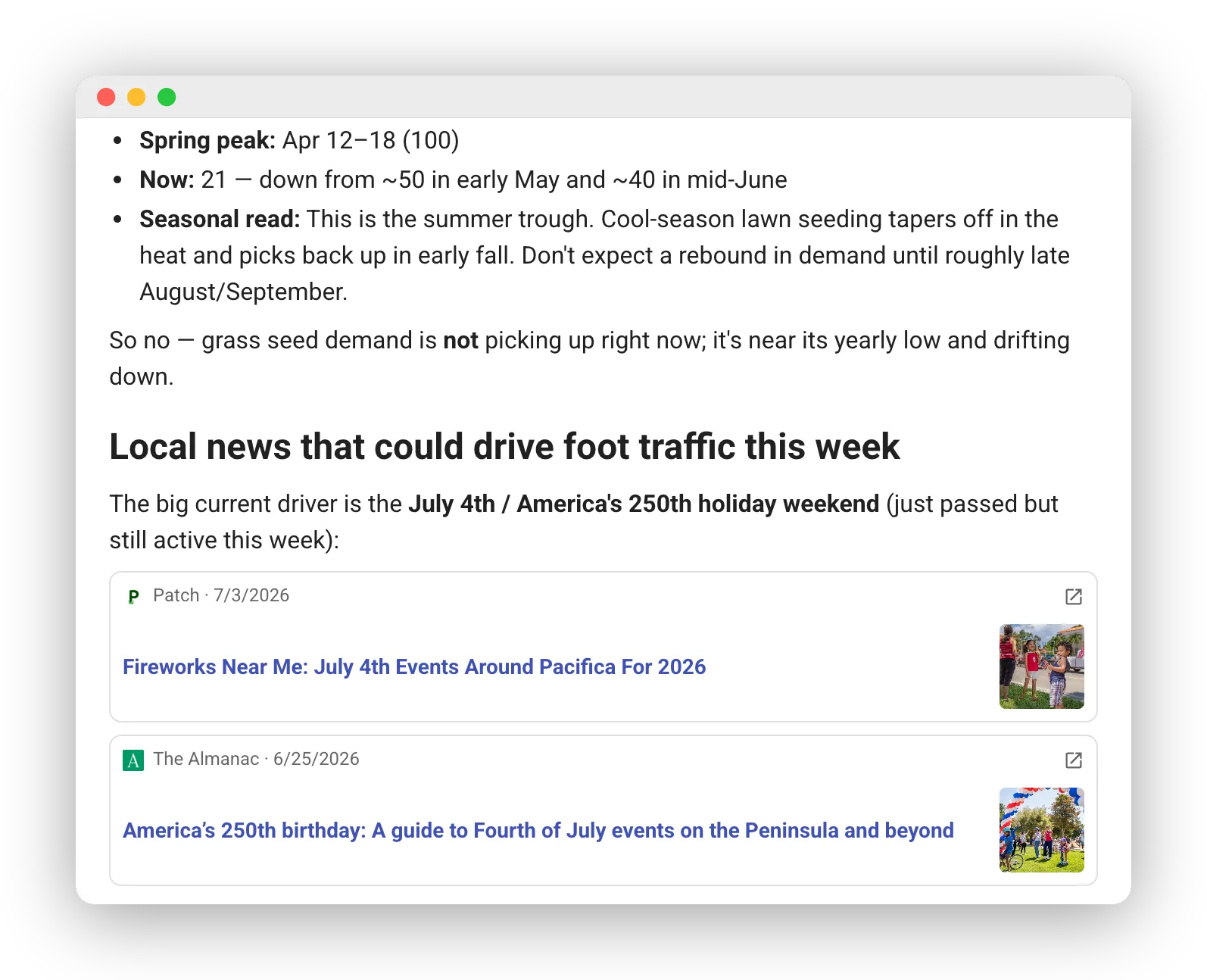
- “Is grass seed interest ramping up yet?” — build the end cap when demand starts climbing, not after it peaks.
- “When does interest in pool chemicals peak around here?” — plan the reset around the curve, not the calendar.
- “Are pellet grills still growing, or was that a fad?” — a year of trend data settles it.
Here too the AI pairs a lookup with the always-included news search — seasonality first, then the local events that could move this week’s foot traffic:
Bigger Requests
Section titled “Bigger Requests”For a job too big for a single pass — reviewing every bay in the store, sweeping a whole department for stale counts — the AI can fan out a bounded crew of read-only helpers that work through it in parallel. It does this on its own when a request is broad enough; you don’t manage the helpers, they just make broad requests finish. Bigger Requests come with Advanced Mode — no extra permission is needed.
Automations
Section titled “Automations”Automations are standing instructions that run on a schedule, unattended. Their runs execute on the Max model and draw on the advanced budget, but creating them needs only the automations:manage permission — no Advanced Mode access required.
An automation created from inside an Advanced Mode chat becomes an Advanced Mode automation: every scheduled run gets the same operational-data access as the chat that created it. (A copy of an Advanced Mode automation stays Advanced Mode — the mode follows what the job needs, not who saved it.) The difference shows when the budget runs out — a regular automation keeps running on the standard Smart model, while an Advanced Mode automation pauses with a note, just like an Advanced Mode chat.
Budget and Pricing
Section titled “Budget and Pricing”Advanced usage is metered in dollars, against a monthly advanced budget your organization controls: an admin sets it on the Usage page of the web dashboard, which also shows the month-to-date spend. You’re billed only for what’s actually used — advanced usage lands on the monthly invoice, in arrears. On top of whatever budget you set, every organization gets a small included allowance each month for trying the advanced features out; a funded budget simply extends it. Both reset at the start of each calendar month.
The budget is one shared pool, drawn on in proportion to the AI work done: a quick lookup draws a little, a long Advanced Mode analysis or a plan take-off draws more. What draws on it (a single job often involves several of these):
- Advanced Mode conversations — the replies, since the whole chat runs on Max.
- The market research lookups — each search, whether run in the chat or by a Bigger Requests helper.
- Bigger Requests — the helpers’ work.
- Plan take-offs — the plan-reading run (that’s why it asks before starting).
- Automation runs — regular and Advanced Mode alike.
Web search and news searches never draw on the budget, even inside an Advanced Mode chat — there, only the conversation’s own replies do.
If the budget runs out mid-month, nothing breaks — the advanced features pause until the month rolls over or an admin raises the budget:
- An Advanced Mode chat says so and pauses. The conversation isn’t lost — it picks up again when there’s budget again. Advanced Mode automation runs pause the same way.
- Regular automations keep running on the standard Smart model instead.
- Every core feature — searching your inventory, tasks, and knowledgebase, creating tasks and posts, image recognition, voice, Think Harder (a one-question re-run on Max, included in the subscription), and ordinary web and news search — keeps working exactly as before. Core features are never metered this way; within everyday fair use, lean on the assistant as much as you like.
Getting Access
Section titled “Getting Access”- Web search and news — nothing needed; on for everyone, in every chat.
- Advanced Mode, including the standard procedures and the market research lookups — your point-of-sale data connected and loaded, plus the
chat:advanced_modepermission. - Bigger Requests — Advanced Mode access; nothing extra.
- Automations — only the
automations:managepermission; an Advanced Mode automation comes from an Advanced Mode chat (or a copy of one), so setting one up from scratch needs that mode’s access too.
See Roles and Permissions for how admins grant each of these.