

Integrations
FastQuery connects to the systems you already use so your data stays in sync and your team gets the most out of the platform. Manage all your integrations from the Integrations page in the web app.
POS / ERP Systems
Section titled “POS / ERP Systems”Sync your inventory data automatically from your point-of-sale or ERP system.
Epicor Eagle
Section titled “Epicor Eagle”FastQuery offers full inventory sync with Epicor Eagle. Once connected, your inventory data flows into FastQuery automatically, and discrepancy reporting helps you spot issues between what your system says and what’s actually on the shelves.
For detailed setup instructions, see the Epicor Eagle guides.
Paladin POS
Section titled “Paladin POS”FastQuery syncs inventory from Paladin POS through an automated SFTP export, so your product and stock data flow in without manual work. For setup, see the Paladin POS guide.
FastQuery syncs inventory from Acceo POS through an automated SFTP export. For setup, see the Acceo guide.
Other POS Systems
Section titled “Other POS Systems”FastQuery supports additional POS systems too. Contact the FastQuery team for details on connecting your specific system.
Warehouse Suppliers
Section titled “Warehouse Suppliers”Access distributor product catalogs directly in FastQuery. This enriches your inventory data with product details, pricing, and availability from your wholesale partners.
FastQuery supports major hardware distributors and buying groups — the Integrations page lists the current options, and new partners are added over time.
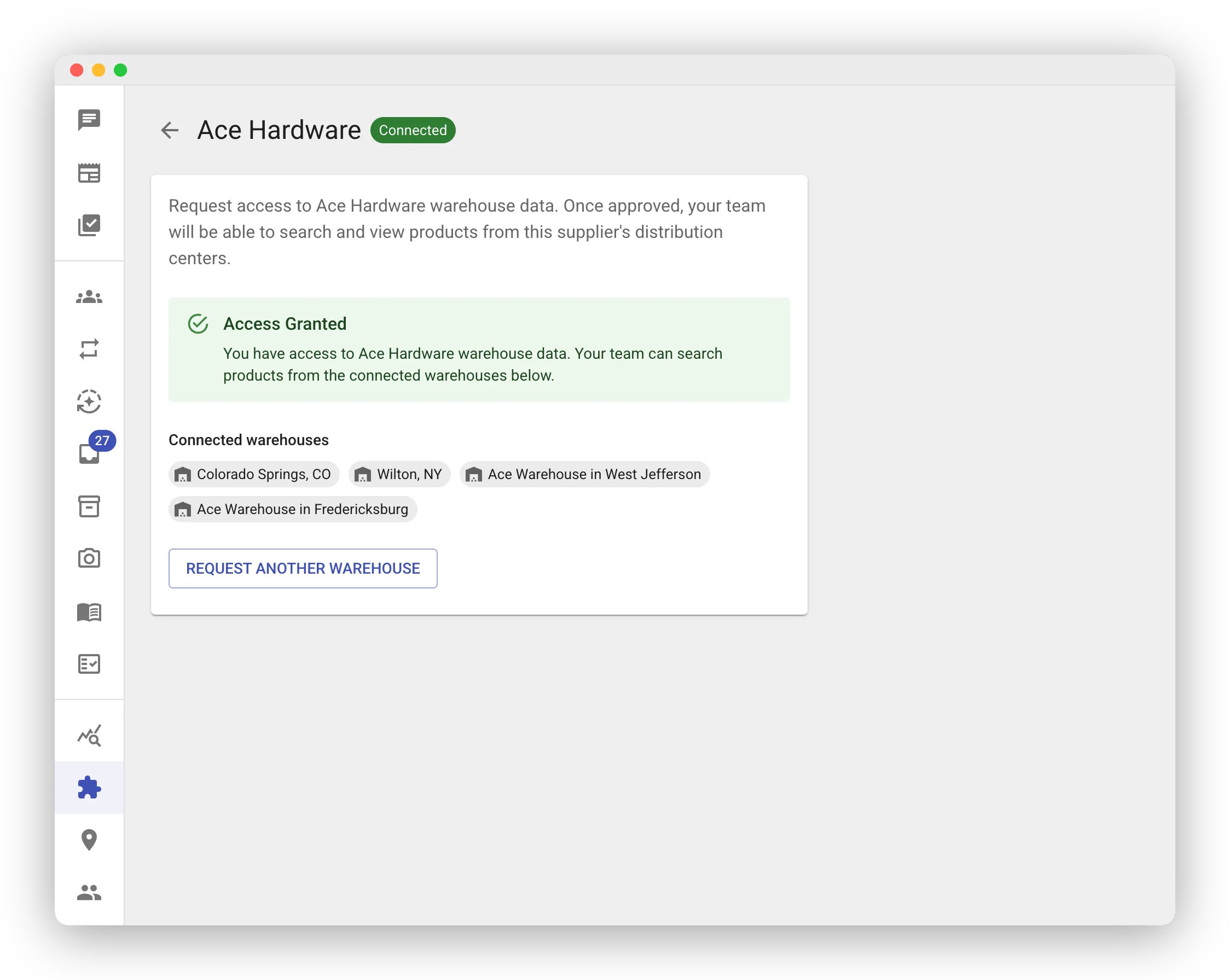
To get started, request access on the Integrations page. Warehouse connections require approval, and you’ll be notified once your request is confirmed. Once approved, distributor product data is woven into your inventory so your team can look up supplier information alongside your own stock.
Each supplier’s page shows the warehouses your organization is connected to. If you need a connection to another of the supplier’s warehouses later, open that supplier’s page and click Request Another Warehouse — the new request goes through the same approval flow. By default every store works with all of your connected warehouses; to pin specific warehouses to specific stores, see Warehouses per Store.
Shelf Scanning (Zippedi and Badger)
Section titled “Shelf Scanning (Zippedi and Badger)”FastQuery connects to shelf-scanning robots from Zippedi and Badger Technologies. The robots monitor your store aisles automatically, and FastQuery can:
- Detect out-of-stock items and create counting tasks for your team automatically
- Identify price mismatches between shelf labels and what’s in your POS system
This helps you catch problems before customers do. For setup, see the Zippedi Integration or Badger Integration guide.
Electronic Shelf Labels
Section titled “Electronic Shelf Labels”FastQuery integrates with the Vusion electronic shelf label (ESL) system. The integration is focused on finding products on the floor, not on pushing prices:
- Flash a label — From a product’s detail screen in the mobile app, tap Flash Label and the matching ESL lights up for about 30 seconds. Handy when you need to walk a customer to an item or verify a label is in the right spot.
FastQuery does not push price changes to your shelf labels — that flow continues to run through your existing ESL system. The integration is one-way: FastQuery sends find-and-flash commands to the ESL system, never the other direction. For setup, see the Vusion ESL Integration guide.
Employee Sync
Section titled “Employee Sync”Automatically keep user facility assignments up to date by syncing from an external employee roster — for example Paycom or UKG. When someone moves to a new store or changes roles in your HR system, FastQuery can pick up those changes so you don’t have to make them manually.
Your payroll system gives every employee a store code, including corporate and office staff who work out of a headquarters that isn’t one of your stores. If those employees carry a headquarters code that doesn’t match a FastQuery location, enter it under Headquarters codes on the Paycom or UKG integration page. FastQuery then routes those people to your Headquarters facility instead of skipping them.
For setup, see the UKG Employee Sync or Paycom Employee Sync guide.
Weekly Reports
Section titled “Weekly Reports”The Weekly Reports integration controls the AI-written weekly report each store gets on its newsfeed every Sunday evening (see Weekly Reports for what’s in them). On its integration page you can:
- Enable weekly reports and choose which facilities get one.
- Add email recipients per facility, plus a separate list for the executive summary. Recipients get the report by email in addition to the feed post; a facility with no recipients is feed-only.
- Add additional guidance — a short note on what your reports should emphasize. It shapes emphasis only; the report’s structure and tone stay the same.
Monitoring Your Integrations
Section titled “Monitoring Your Integrations”The Integrations page gives you a clear view of each connection’s health:
- Status — whether the integration is connected and running
- Last sync time — when data was last exchanged
- Recent events — a log of what’s happened, including any errors
If something goes wrong with a sync, you’ll see it here so you can take action quickly.
For Epicor Eagle, you can also tune feed-quiet alerts to your store’s open hours so a closed store doesn’t trigger a false “feed down” alert. See Inventory-update alerts (store hours).