

MangoReport Integration
Mango Report (also spelled Mangoreport) is a reporting service for Epicor Eagle stores that produces a monthly cycle-count list per store. The FastQuery integration turns those lists into counting tasks automatically, so your team counts from their phones instead of printed Mango Report sheets.
Connect MangoReport to FastQuery in two steps. You need the admin role to complete this setup.
Step 1: Locate Your FTP Credentials
Section titled “Step 1: Locate Your FTP Credentials”Open the last MangoReport email you received and locate your FTP credentials:
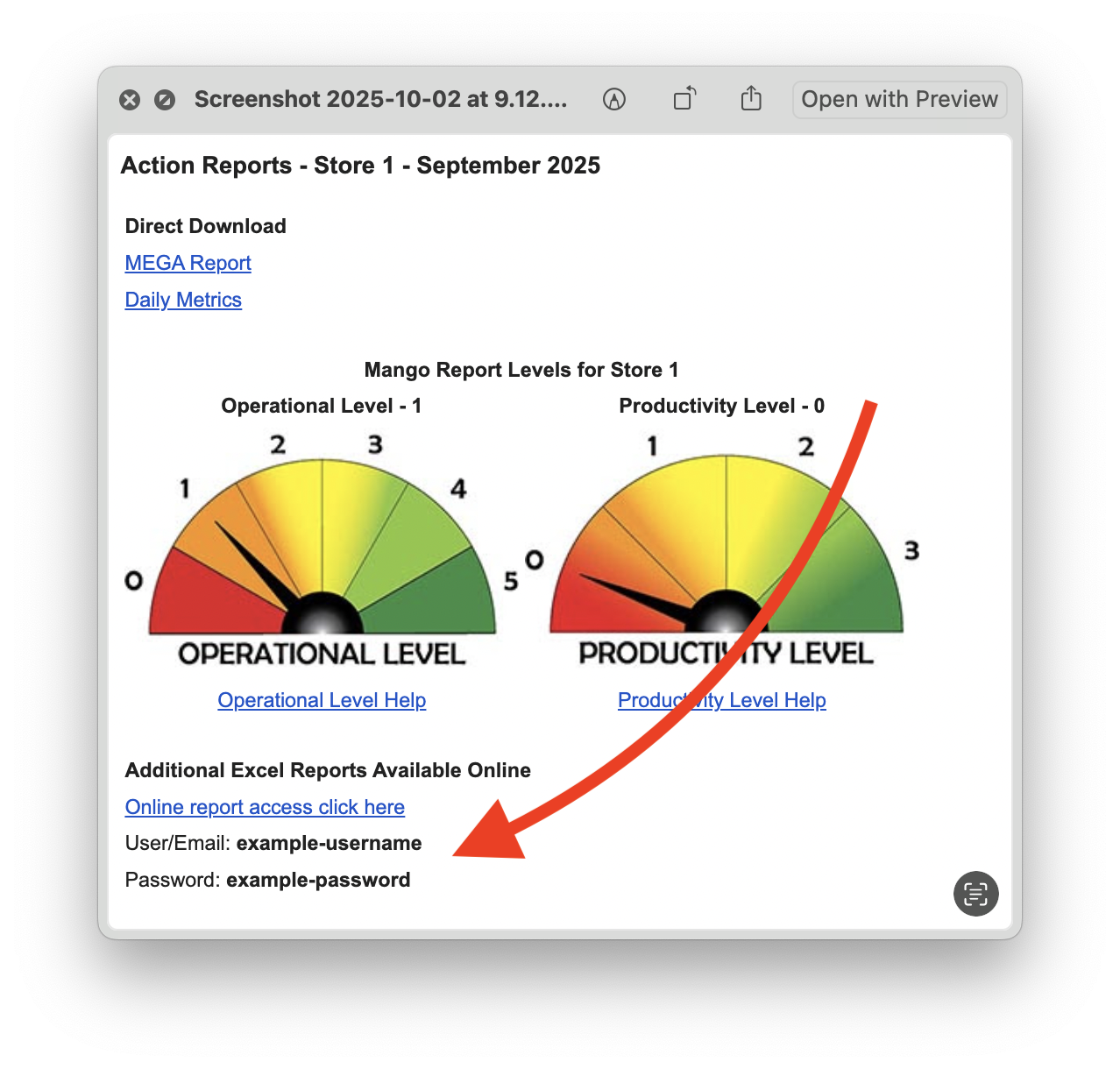
Step 2: Enter MangoReport Credentials
Section titled “Step 2: Enter MangoReport Credentials”Go to Integrations > MangoReport in FastQuery and paste the User/Email and Password from the MangoReport email. Credentials are stored encrypted.
That’s it — Mangoreport tasks will be created automatically in FastQuery on the 2nd day of every month.
How It Works
Section titled “How It Works”On the 2nd of each month, FastQuery signs into the Mango Report file server with your credentials and reads each store’s folder. Stores are matched by the store code at the end of the folder name (e.g. “Main Street (123)” or “Main Street (B)”) — it must correspond to a store code configured in FastQuery, so if a store’s tasks aren’t appearing, the store-code mapping is the first thing to check.
From each store’s monthly Mango CSV (the “Including missed SKUs” list), FastQuery creates up to two counting tasks per store:
- 🥭 Mango Counts - {Month} — the regular monthly count list.
- 🥭 Mango RC Counts - {Month} — items Mango Report flags as RC, split into their own task.
The tasks appear in Todo > New at each store. They are blind counts — no expected quantity is shown, your team just records what’s on the shelf.
Each store gets its Mangoreport tasks once per calendar month — re-runs never create duplicates. Stores added to FastQuery mid-month are picked up by a manual re-run or the next monthly run.
Partial counts and the live task
Section titled “Partial counts and the live task”A store rarely counts the whole month’s list in one sitting. Each time your team finalizes a batch, FastQuery splits the counted SKUs into a completed task renamed 🥭 Mango Counts - {Month} (partial {date}) and leaves the still-uncounted SKUs in the live 🥭 Mango Counts - {Month} task. So over a month you’ll see one live task plus a chain of (partial …) tasks, and the live task’s item count shrinks as work gets done. The month’s full list is the live task’s remaining items plus every (partial …) task’s items added together.
This is why a SKU can be on the Mango/Eagle list yet not in the live FastQuery task: it was most likely already counted and now lives in one of the (partial …) tasks. To confirm, look across the whole month’s tasks for that store, not just the live one.
It is also why the remaining-SKU counts differ between Eagle and FastQuery. FastQuery drops a SKU from the live task the moment it’s counted, but Eagle’s county list keeps showing it as outstanding until you import that month’s count results back into Eagle via the PIP files from each finalized Counts task (see Importing PIP Files). Until those imports happen, Eagle’s remaining list stays larger than FastQuery’s by the number of SKUs already counted but not yet imported.
Notifications
Section titled “Notifications”When tasks are created, FastQuery sends an email to each store’s assigned managers letting them know how many Mango Report counting tasks were created and where to find them. If a store has no emails assigned, the notification goes to org admins instead, with a note explaining how to assign store emails (FastQuery app → Preferences → Edit Locations). Org admins also receive a single summary email covering all stores.